SCORM vs LTI: The Difference Is Who Holds the Course
اقرأ بالعربية →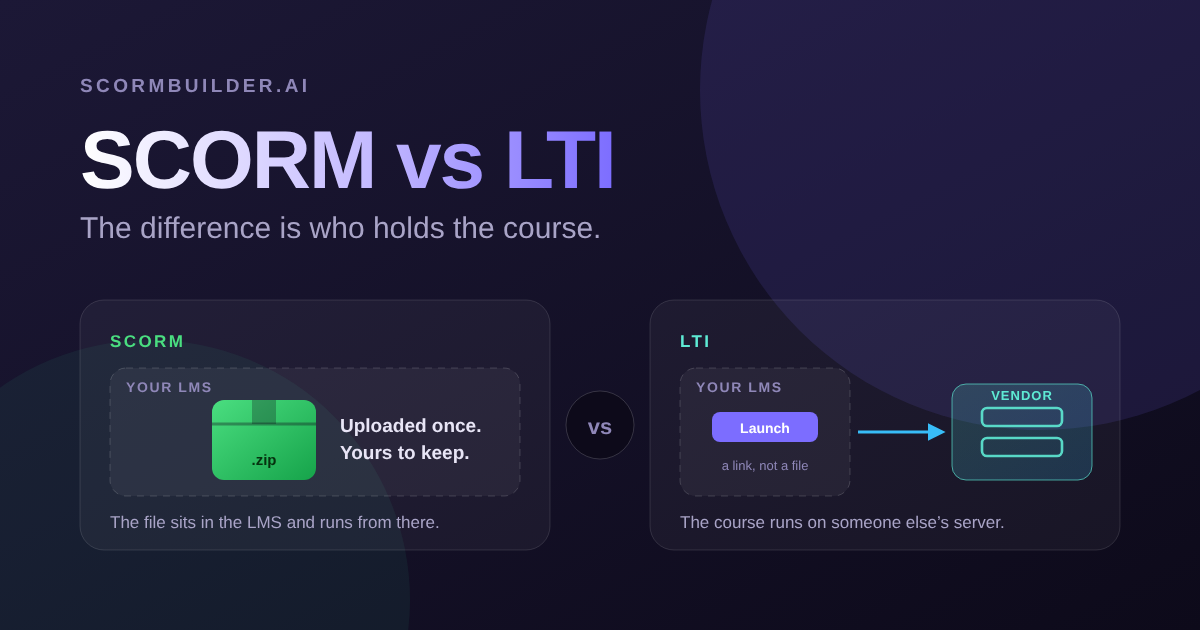
If you administer an LMS for long enough, someone will eventually ask whether a course should go in as a SCORM package or come in over LTI. The question sounds technical. It is mostly a question about hosting and ownership — who stores the course, who runs it, and what happens to it when the commercial relationship ends.
Here is the short version: SCORM is a file you upload. LTI is a link you launch. Everything else follows from that.
What SCORM actually is
SCORM — Sharable Content Object Reference Model — is a packaging and runtime standard. An authoring tool exports a zip containing HTML, CSS, JavaScript, your images and audio, and a manifest file describing the structure. You upload that zip into your LMS, and from then on your LMS stores it, serves it, and talks to it.
While a learner is working through it, the course and the LMS exchange data through a JavaScript API in the browser: a completion status, a score, the time spent, sometimes which question was answered how. When the learner closes the window, that data is already in your LMS.
The important consequence is the one nobody mentions in the specification: after the upload, the course is yours. It does not phone home. It does not need the tool that produced it to still exist.
What LTI actually is
LTI — Learning Tools Interoperability, maintained by 1EdTech — is not a packaging format at all. Nothing gets uploaded. LTI is the handshake that lets your LMS hand a learner over to a different system and get a result back.
An administrator registers the external tool once, exchanging keys so the two systems trust each other. After that, a learner clicking the activity is launched into the vendor’s platform, carrying a signed assertion that says who they are and what role they hold. They do the work there. The tool reports a score back over the grade service, and the learner lands back in your LMS.
So the content never enters your LMS. It stays on the vendor’s servers, and your LMS holds a pointer to it.
SCORM vs LTI at a glance
| SCORM | LTI | |
|---|---|---|
| What it is | A packaging and runtime format | A connection and launch protocol |
| What you upload | A zip file containing the whole course | Nothing — a tool registration |
| Where the content lives | In your LMS | On the vendor’s servers |
| Who serves the bandwidth | You | The vendor |
| How data is reported | Browser JavaScript API | Server-to-server, signed |
| Typical data captured | Completion, success, score, time, per-question detail | Score and completion |
| Security review needed | File upload, usually routine | External data flow, usually a full review |
| Works offline or air-gapped | Yes, inside your LMS | No |
| If the vendor disappears | The course keeps running | The activity becomes a dead link |
| Most common home | Corporate and government L&D | Higher education |
Four differences that decide it in practice
1. Who serves the course, and who pays for it
With SCORM, your LMS serves every image and every audio file to every learner. That is your storage and your bandwidth, and a media-heavy course across a large audience is a real number. With LTI, the vendor absorbs that — and prices it into the licence.
This cuts both ways, and the direction depends on your network. If your learners sit behind a corporate firewall or on a government network, “the vendor serves it” means a dependency on an external host being reachable and fast from inside your estate. A SCORM package has no such exposure: it is already inside.
2. What the LMS actually records
SCORM’s runtime was designed to report in detail — completion separate from success, score, time, and interaction-level data if the authoring tool writes it. LTI’s grade service was designed around the thing a university needs most, which is a score in a gradebook.
In practice LTI reporting is thinner, and the richer analytics usually live in the vendor’s own dashboard rather than in your LMS. If your reporting obligation is “show me completion by department from our LMS”, SCORM puts that data where you need it. If you are happy to pull reports from two places, that matters less.
For anything beyond either standard’s reporting — learning that happens outside the LMS entirely — the question becomes SCORM vs xAPI instead, which is a different comparison.
3. Who has to approve it
A SCORM upload is a file in a system you already run. Most organisations treat that as routine.
An LTI integration sends learner identity to a third party, continuously, for as long as the integration exists. That is a data-protection question, not just a technical one — which means a security review, probably a processing agreement, possibly a DPIA, and a conversation with whoever owns data protection in your organisation. In a government or regulated environment that review is measured in weeks, and it is the single most underestimated cost of choosing LTI.
4. What survives the ending
This is the difference that gets discovered too late.
An LTI activity is a pointer. When the contract ends, when the vendor is acquired, or when the renewal is not approved, the launch stops working. The activity remains in your LMS as an entry that leads nowhere, and the content behind it was never yours.
A SCORM package behaves the opposite way. Because the file was uploaded into your LMS, it keeps running after you stop paying the tool that built it. Courses built years ago still launch, still score, still report, long after the subscription that produced them lapsed.
If a course represents a compliance obligation — the training you must be able to prove people completed — that difference is not a preference. It is the requirement.
LTI 1.1, LTI 1.3 and LTI Advantage
If you are evaluating an LTI tool, check its version before anything else.
LTI 1.1 signed its launches with a shared secret using OAuth 1.0a. It is obsolete, and security teams reject it for new integrations.
LTI 1.3 replaced that with OAuth 2.0 and signed JWTs, with keys exchanged during registration. This is the version to insist on.
LTI Advantage is a set of services built on 1.3. The three worth knowing: Assignment and Grade Services for passing scores back, Names and Role Provisioning for roster access, and Deep Linking, which lets an instructor browse a vendor’s catalogue from inside the LMS and insert a specific item. Deep Linking is the feature that makes LTI genuinely pleasant for publisher content, and it has no SCORM equivalent.
Support is uneven. Plenty of tools advertise “LTI” and mean 1.1, and plenty support 1.3 Core without the Advantage services you assumed came with it. Ask which specific services are implemented.
Does LTI replace SCORM?
No, and the framing is the problem. They answer different questions.
Use LTI when the learning genuinely lives somewhere else and needs to: a proctored exam service, a coding sandbox, a simulation that needs the vendor’s compute, a publisher’s library you licence rather than own.
Use SCORM when you have produced a self-contained course and want it to live in your LMS: induction, compliance, product training, policy, anything you authored yourself.
Most mature deployments run both. Internally produced courses go in as packages; a small number of external services connect over LTI. They are not rivals; they are answers to the question of where the content should sit.
Choosing, in one table
| If this is true | Choose |
|---|---|
| You authored the course yourself | SCORM |
| It is compliance training you must evidence for years | SCORM |
| Learners are behind a restrictive firewall or on an isolated network | SCORM |
| You need completion and score inside your own LMS reporting | SCORM |
| The tool must run live on the vendor’s infrastructure | LTI |
| You are licensing a catalogue and want instructors to browse it | LTI (Deep Linking) |
| The vendor updates the content continuously and you want the latest | LTI |
| You cannot get a security review approved this quarter | SCORM |
Where SCORMBuilder.ai fits
Plainly: SCORMBuilder.ai is an authoring tool, not an LTI tool. It exports SCORM 1.2, SCORM 2004, xAPI and cmi5 packages that you upload into your LMS, which puts it firmly on the SCORM side of this comparison. We do not publish an LTI tool, and if your requirement is an LTI 1.3 integration, we are not the answer to it.
What that does mean is that the packages are self-contained — fonts, images, narration audio and video are bundled into the export — so a course you built keeps working in your LMS whether or not you are still a customer. For induction and compliance content, that is usually the property that matters most.
If you are new to the standards, start with what is SCORM, or see uploading a SCORM course to Moodle for the practical side.
Frequently Asked Questions
What is the difference between SCORM and LTI?
SCORM is a packaging format: you export a zip file and upload it into your LMS, where it then lives and runs. LTI is a connection protocol: nothing is uploaded, and the LMS launches a tool that runs on someone else's servers, receiving a score back when the learner finishes. SCORM moves content; LTI connects systems.
Does LTI replace SCORM?
No. They solve different problems and are routinely used side by side in the same LMS. LTI is the better answer when you are connecting to a live external system — a proctoring service, a coding platform, a publisher's catalogue. SCORM is the better answer when you have produced a self-contained course and want it to live in your LMS.
Which is better for a corporate LMS, SCORM or LTI?
For course content produced in-house, SCORM is usually the simpler answer: one file, no firewall rules, no vendor uptime to depend on, and it keeps working if the authoring subscription ends. LTI earns its place when you are integrating a third-party service that genuinely needs to run on its own infrastructure.
What happens to LTI content when the contract ends?
It stops working. An LTI link points at a vendor's server, so when the agreement ends the launch fails and the activity becomes a dead link in your LMS. A SCORM package behaves differently: because the file was uploaded into your LMS, it continues to run and to record completions after you stop paying the tool that produced it.
What is the difference between LTI 1.1 and LTI 1.3?
LTI 1.3 replaced LTI 1.1's shared-secret signing with OAuth 2.0 and signed JWTs, which is why security teams treat it as the only acceptable version for new integrations. LTI 1.3 is also the base for LTI Advantage, which adds grade passback, class roster access, and deep linking so an instructor can browse a vendor's catalogue from inside the LMS.
Can you use SCORM and LTI together?
Yes, and most mature LMS deployments do. A typical setup has internally produced courses uploaded as SCORM packages and a handful of external services connected over LTI. They are not competing choices for the same activity; they are different answers to the question of where a piece of learning content should live.